Published: Oct 15, 2025
•
6 min read

Audience
The dashboard serves three stakeholder groups:
- Operations Managers: Monitor drive health, failures, and replacement planning across data centers
- Engineers & Procurement: Identify failure patterns by vendor/model to inform HDD purchasing decisions
- Data Scientists: Explore dataset for reliability modeling and long-term performance trends
Dataset
Backblaze hard drive telemetry data between January 1st and 31st, 2025.
- Drives: 321,201 (4.0+ exabytes)
- Columns: 200+
KPIs
- Annualized Failure Rate (AFR): % of drives failing annually
- Drive Count in Service: Active population by vendor/model
- Failure Count: Total failures over reporting period
- Average Time Between Failures:
- Average Age at Failure: Typical drive operational lifespan
- Failure Probability by Drive Age: Risk analysis
- Average Drive Age: Risk analysis
Dashboard Structure
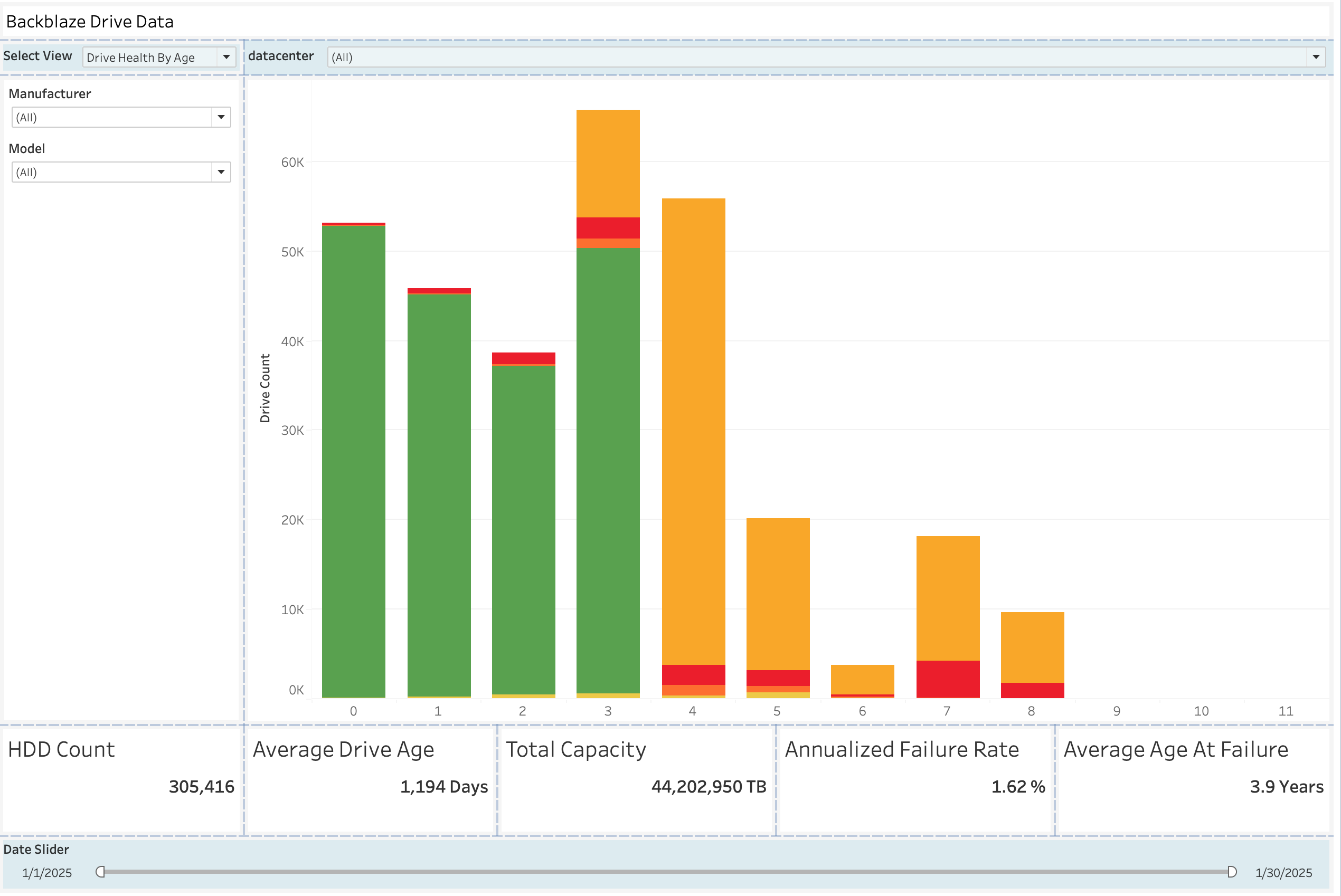
The dashboard uses a multi-view layout with a top-level "Select View" (top left) dropdown that switches between different graphs. Five key metric cards are always visible at the bottom. This design serves all three audience groups: operations managers get a quick perspective on health summaries, procurement teams can explore vendor/model comparisons, and data scientists can explore reliability patterns.
Metric Cards → KPI's
HDD Counttracks total drives in service for capacity managementAnnualizedFailure Rate directly informs replacement planning and budget forecastingAverage AgeAt Failure guides optimal replacement timingAverage Drive Ageprovides fleet maturity context- `Total Capacity enables capacity and utilization planning
Filtering
- Top filter bar: Datacenter selection for facility-level analysis
- Left sidebar filters: Manufacturer and Model dropdowns enabling procurement to compare vendor performance
- Date slider (bottom): Temporal filtering (1/1/2025 - 1/30/2025) allowing trend analysis
Data Cleaning & Pre-processing
Decoding Model Numbers and Drive Size
ST14000NM0138→ Seagate 14TBWDC WUH721414ALE6L4→ Western Digital 14TBHGST HMS5C4040ALE640→ HGST 4TB
Mapping SMART codes
Critical Failure Predictors
- SMART 5 (Reallocated Sectors): Most important predictor, any increase signals imminent failure
- SMART 187 (Uncorrectable Errors): Strongly correlated with near-term failure
- SMART 188 (Command Timeout): Indicates controller/mechanical issues
- SMART 197 (Pending Sector Count): "Pre-failure" warning indicator
- SMART 198 (Offline Uncorrectable Sectors): Secondary failure predictor
Operational Metrics
- SMART 9 (Power-On Hours): Calculates drive age for AFR and lifespan analysis
- SMART 194 (Temperature): Monitor for thermal stress in data centers
- SMART 12 (Power Cycle Count): This wasn't used, and likely isn't relevant in a datacenter.
Dataset reduction
A python script was used to remove the majority of the columns in the dataset. This reduced the size of the files by about 75%.
Design Choices
Color Selection
The dashboard's colors serve three purposes:
- A green-to-red gradient communicates drive health information (green for operational, orange/yellow for aging, red for failed drives).
- The deep red accents align with Backblaze's brand for visual consistency.
- Background contrasts (white filter panels against gray visualization areas, with blue highlighting less obvious selectors) create clear separation between interactive controls and data.
Chart & Layout Rationale
Reflection
Most of this project involved learning Tableau and dealing with its issues. I went through the DataCamp course and learned the basics, but getting comfortable building the dashboard took significant time. Once I understood how to structure the data sources and panels, the interactive filtering worked well. It's clear (besides the errors I experienced) why people use it for this kind of work.
The main issue was Tableau crashing frequently. Loading more than about 7 days of data would cause the application to lock up or crash entirely. I capped the dataset at 9 days to have a working version. Additionally, the project got corrupted at one point and I lost a week of work. I also encountered UI bugs like the Data Source tab becoming unclickable. It was incredibly frustrating to work through these stability problems.
If I were to do this again, I would build it as a web dashboard instead. I have much more experience with JavaScript, HTML, and CSS, and I could have built something comparable significantly faster. Tableau works for certain use cases, but in this instance, it felt unnecessary, especially given the instability issues (I would get a new error every single time I would open the project).
If I had more time I would want to try connecting to a database and spend a lot more time extracting information from the dataset.
Code
Pre-processing code
# Columns to keep
columns_to_keep = [
    'date',
    'serial_number',
    'model',
    'capacity_bytes',
    'failure',
    'datacenter',
    # SMART raw values only
    'smart_5_raw',      # Reallocated Sectors
    'smart_9_raw',      # Power-On Hours
    'smart_12_raw',     # Power Cycle Count
    'smart_187_raw',    # Reported Uncorrectable Errors
    'smart_188_raw',    # Command Timeout
    'smart_194_raw',    # Temperature
    'smart_197_raw',    # Current Pending Sectors
    'smart_198_raw'     # Offline Uncorrectable Sectors
]

# Get all CSV files
csv_files = [f for f in os.listdir(input_directory) if f.endswith('.csv')]

print(f"Found {len(csv_files)} CSV file(s) to process:\n")

for filename in csv_files:
    try:
        input_file = os.path.join(input_directory, filename)
        output_file = os.path.join(output_directory, filename)

        print(f"Processing: {filename}...")

        # Read only the columns you need
        df = pd.read_csv(input_file, usecols=columns_to_keep)

        # Save to _filtered directory
        df.to_csv(output_file, index=False)

        print(f"  ✓ Saved to: _filtered/{filename}")
        print(f"  ✓ Columns: {len(df.columns)}, Rows: {len(df):,}\n")

    except Exception as e:
        print(f"  ✗ Error processing {filename}: {str(e)}\n")
Click here to download the Tableau Packaged Workbook.
AI Usage Transparency
AI tools (ChatGPT/Claude) were used in the following ways during this project:
- Data Preprocessing: Generated Python script templates for reducing and transforming the Backblaze dataset.
- Writing Review: Checked dashboard documentation for spelling, grammar, and alignment with assignment.
- Calculated Fields: Assisted with equations for a few calculated fields in Tableau (annualized failure rate) before I became comfortable with calculated fields.